
Using DoneSafe – Information for Staff and Contractors
You can access DoneSafe at: https://paraway.donesafe.com
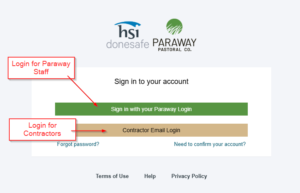
Paraway Staff
- Paraway staff can find links to all DoneSafe How-To Documents on Sharepoint: WHS / Incident Reporting
- These resources cover logging in, completing forms, reporting incidents, and general system use.
Contractors
- A guide for contractors is available at Donesafe - Guide for Contractors
- If you’ve received an email asking you to confirm your DoneSafe account:
- Go to https://paraway.donesafe.com
-
Select “Need to confirm your account”
- When logging in, click the sand coloured button labelled "Contractor Email Login"
- You can also reset your password from this same page.
Knowledge Base
- Don’t forget the extensive online knowledge base available within DoneSafe. This includes: Safe work procedures and other WHS resources
- Access it anytime through the Donesafe Knowledge Base